Impostor
This is a challenge that I have created for the Cybernight 2025 CTF competition, under the Web category.
Just like his previous challenge (Framed), it was based on a real-time collaborative pixel canvas using:
When loading the page, the server sends the initial canvas as a PNG.
Then the client establishes a WebSocket connection to receive all live pixel updates.
Whenever a user clicks a pixel, the frontend triggers:
/api/pos-info?x=<X>&y=<Y>
which returns information such as the current color, the last user who modified the pixel, and timestamps.
Up to this point, everything still looks like a typical r/place setup.
The challenge
Unlike the previous stegano-based challenge, this one hides the flag by exploiting user identity metadata.
Two users were created, they had the same username (thanks to a unicode trick) but different user IDs.
One of these users is the "impostor" who secretly draws the flag pixel by pixel.
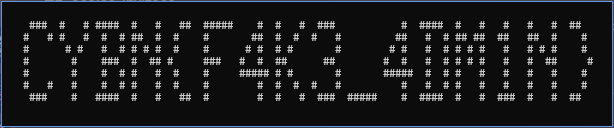
If you filter the canvas only by pixels placed by a specific user, the real flag appears.
So the intended solution was:
- Query every coordinate of the canvas using
/api/pos-info. - Collect the user ID responsible for each pixel.
- Reconstruct a new image or matrix grouped by user ID.
- Inspect each user layer until the flag becomes obvious.
Manually clicking every pixel would be impossible, of course — the canvas is large, and each pixel requires an HTTP request.
This is where automation comes in.
Automating the extraction
The solution was to write a small script that:
- loops through the entire canvas (width x height),
- calls
/api/pos-info?x=X&y=Y, - stores the
(X, Y, user_id, color), - and finally reconstructs separate images per user (or at least highlight one user's pixels).
Here is an example implementation by NozZy : https://github.com/CyberNight-Efrei/CYBN-2025/blob/7e606cc0e9061d616d84f26e163f25783cb9a864/challs/Web/impostor/writeup/solve.py
Recovering the flag
Once the data was collected, simply rendering only the pixels belonging to the “impostor” user revealed the hidden pattern.